
Is There an Instagram MCP Server? How to Connect Claude or ChatGPT to Your Account Safely

\
You watch a video where someone asks Claude to "schedule three posts for next week," and the posts show up on the calendar. It looks like magic. Then you search for "Instagram MCP" and land on a list of GitHub repositories, each with its own setup guide. Some of them even ask for the account's username and password.
The question that's left is simple: is there an official, safe way to do this?
There is a safe way, but it doesn't go through an "Instagram MCP" built by Meta. It goes through a tool that already publishes to Instagram the official way and opens that access to your AI, with the permissions you choose.
Is there an official Instagram MCP server?
Not for everyday account management. On Meta's developer page for MCP, checked on November 13, 2026, Meta lists three official servers: Meta Ads MCP, for managing ads and campaigns; Meta Social Technologies MCP, for people who build apps and integrations on Meta's developer platform; and WhatsApp Business Tools MCP, for managing a WhatsApp Business Platform integration.
None of them is built to publish to your feed, answer comments on your account or read how your posts performed. If your question was about paid campaigns, Meta's ads server is the right place. If it was about the day-to-day work of an account, with posts, Reels, Stories and comments, you need a different route.
The "Instagram MCP servers" that show up in search are third-party projects. Some are well made. Others ask for your login and password, and that's where the risk lives.
What is MCP, explained without jargon?
MCP stands for Model Context Protocol. In practice, it's a standard way for an AI to use other tools. Think of a power outlet: any device with the right plug works in any compatible outlet. With MCP, an assistant like Claude or ChatGPT can use any tool that offers an "MCP server," without a custom integration for every pair.
The MCP server is the part the tool provides. It tells the AI what it's allowed to do there: create a post, check the calendar, read comments. The AI can't do anything the server doesn't offer.
If you want to go deeper into the concept, the article what is MCP covers the background and how marketers use it. Here, what matters is the practical effect. The AI doesn't "get into" Instagram on its own. It asks a tool to do it, and the tool does it the way Instagram allows.
Why do some "Instagram MCPs" ask for your password, and why is that a problem?
When a tool asks for your Instagram username and password, it isn't using an authorization screen. It's logging in to the account as if it were you.
With a secure connection, you sign in on Instagram's or Facebook's own screen and approve what the tool can do. The tool receives an authorization, not your password. If something goes wrong, you revoke that authorization without having to change the account password.
Handing a brand account's password to a program you barely know puts at risk exactly the asset that took the most work to build. If you manage a client's account, it gets even more delicate: the password isn't yours to hand over.
One simple rule helps when choosing. If the setup guide asks for your Instagram password, stop. If it asks you to authorize on an official screen and shows what the AI will be able to do, you're on the right track.
Do you need a business or creator account?
Yes. Publishing the official way only works with Business or Creator accounts. A personal account can log in, but Instagram won't publish from it through that route. That's why PostRite refuses to connect personal accounts and asks you to convert first, instead of saving a connection that would fail on the first post.
Switching is free and takes a minute in the Instagram app, under Settings → Account type and tools.
PostRite offers two ways to connect Instagram. Instagram Login needs no Facebook account and is the right choice for most accounts. Via Facebook requires the account to be linked to a Page you manage, but it unlocks a few extras, such as music from Instagram's catalog on Reels, the paid partnership label and competitor comparison. The Instagram documentation explains the differences.
What can Claude or ChatGPT do on Instagram through MCP?
With PostRite connected, the AI works with the same permissions you have in your organization. It can never do more than you can.
| You ask | What the AI does | What needs to be on |
|---|---|---|
| "Schedule these three captions on my Instagram next week, at my best times" | Checks your best times and creates the scheduled posts | Remote MCP access |
| "Publish this video as a Reel tomorrow morning, with this first comment" | Creates the Reel with Instagram's options | Remote MCP access |
| "What were my five best posts in the last 30 days, and what do they have in common?" | Reads engagement metrics and compares the posts | Remote MCP access |
| "How is my account doing against the competitors I track?" | Reads competitors' numbers next to yours | Remote MCP access and a Via Facebook connection |
| "Answer today's comments that ask how to use the product" | Opens the comments inbox and replies | Comment and message replies enabled by the owner |
On Instagram, the AI can create a post, Reel or Story and set the first comment, collaborators, trial Reels, cover, music, the AI-generated content label and paid partnership. Before scheduling, it can check the post against each network's rules without saving anything, and tell you what needs to change.
For analytics, it reads post engagement, the top posts for a period and your best days and times from the last 12 months. It can also turn those best times into scheduling slots, skipping the ones that already have a post. On Instagram, it also reads followers, reach, views and audience. When a figure doesn't come back from Instagram, it tells you why instead of showing a zero.
This changes the routine in a very concrete way. Competitor analysis, which used to take a spreadsheet and an afternoon, becomes a question. The article on Instagram competitor analysis shows what to compare.
Can the AI answer comments and messages?
It can, but only when the organization owner allows it. That switch is off by default, and only the owner can turn it on. While it's off, no AI reads or answers comments and messages, whatever permission was granted in the connection.
With the switch on, the AI opens the comments inbox and replies to, resolves and hides comments. It also reads conversations and sends text messages, using the team's saved replies when one fits.
Instagram's rules still apply. The AI only sends messages within 24 hours of the person's last message, sends one private reply per comment and doesn't reply to hidden comments.
There's one use that tends to surprise people. Assistants that run scheduled tasks can check comments at regular intervals, without anyone opening a chat. In Claude, scheduled tasks come with the paid plans, run hourly, daily or weekly, and keep running while your computer is off. PostRite needs nothing extra for this, because the schedule lives in the assistant.
The secret is in the instructions. Write them as if you were handing the job to a new intern:
"Every hour: open the PostRite comments inbox. Answer the unanswered comments and messages that ask how to use the product, with a saved reply when one fits. Hide obvious spam. Leave complaints, billing questions and anything you're unsure about for me. At the end, list what you did."
The last sentence matters most. It makes sure the AI handles the repetitive work and leaves what needs care to a person.
How do you connect Claude and ChatGPT without writing code?
First, the organization owner turns on Remote MCP access under Settings → General → AI Assistants in PostRite. Without it, no AI can connect.
In Claude, PostRite is in the connectors directory. You search for PostRite, click connect and sign in. On the authorization screen, you choose which organizations the AI can reach, review the permissions and confirm. The connector works in Claude on the web, desktop and mobile. On Team and Enterprise plans, an owner connects it for the team first, and then each member connects their own account.
In ChatGPT, the connection goes through Developer mode, which OpenAI offers on eligible paid plans. You turn on Developer mode in settings, add a new app, paste PostRite's MCP server URL and choose OAuth as the authentication. The same authorization screen appears. Then you turn PostRite on from the tools menu in a new chat. OpenAI moves these menus around from time to time, so check the current path in ChatGPT's help.
In both cases, the AI never receives your password. The full walkthrough, with the server URL, is in the AI assistants documentation. If you use Claude every day, the guide on how to use Claude to manage social media has prompts for marketing work.
How do you stop the AI from deleting posts or answering what it shouldn't?
This is what worries people who manage client accounts the most, and rightly so. A misread request can't turn into a deleted post.
In PostRite, each risk has its own switch, and they all start off:
- Remote MCP access. Without it, no AI connects to the organization.
- Allow deleting via remote MCP. While it's off, the AI can read and create, but any attempt to delete a post, template or media file is refused.
- Let AI assistants answer comments and messages. Without it, the AI can't open the comments and messages inboxes.
Turning off remote MCP access or deletion takes effect immediately. With remote MCP access, existing connections stop working on their very next request.
When connecting, you also choose which organizations the AI can reach. An agency can give the AI access to one client and leave the others out. And if you change your mind, you revoke access under Settings → Account → Connected AI assistants. Keep in mind that removing the connector only inside Claude or ChatGPT doesn't guarantee the authorization ends in PostRite. To end it for good, revoke it in PostRite.
Where does PostRite fit into this routine?
PostRite is a social media management platform with its own MCP server. It publishes to 12+ networks, Instagram among them, and lets Claude, ChatGPT and other compatible assistants use that work with the permissions you set.
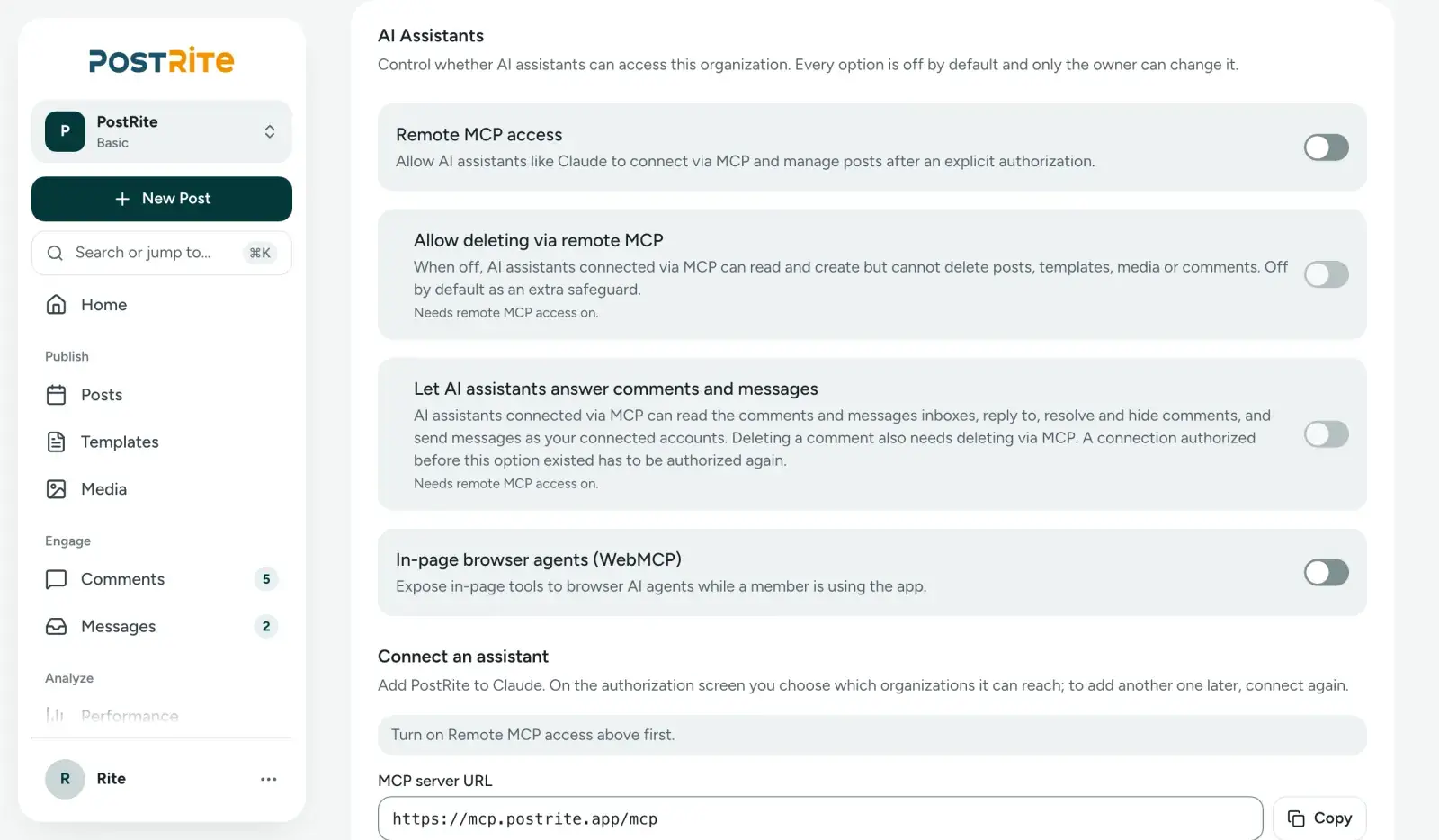
The access switches for AI assistants live in the organization settings, and they all start off.
What the AI creates shows up on the same calendar the team uses. A post scheduled by Claude can be reviewed by someone else, adjusted in the editor or sent for client approval, like any other post.
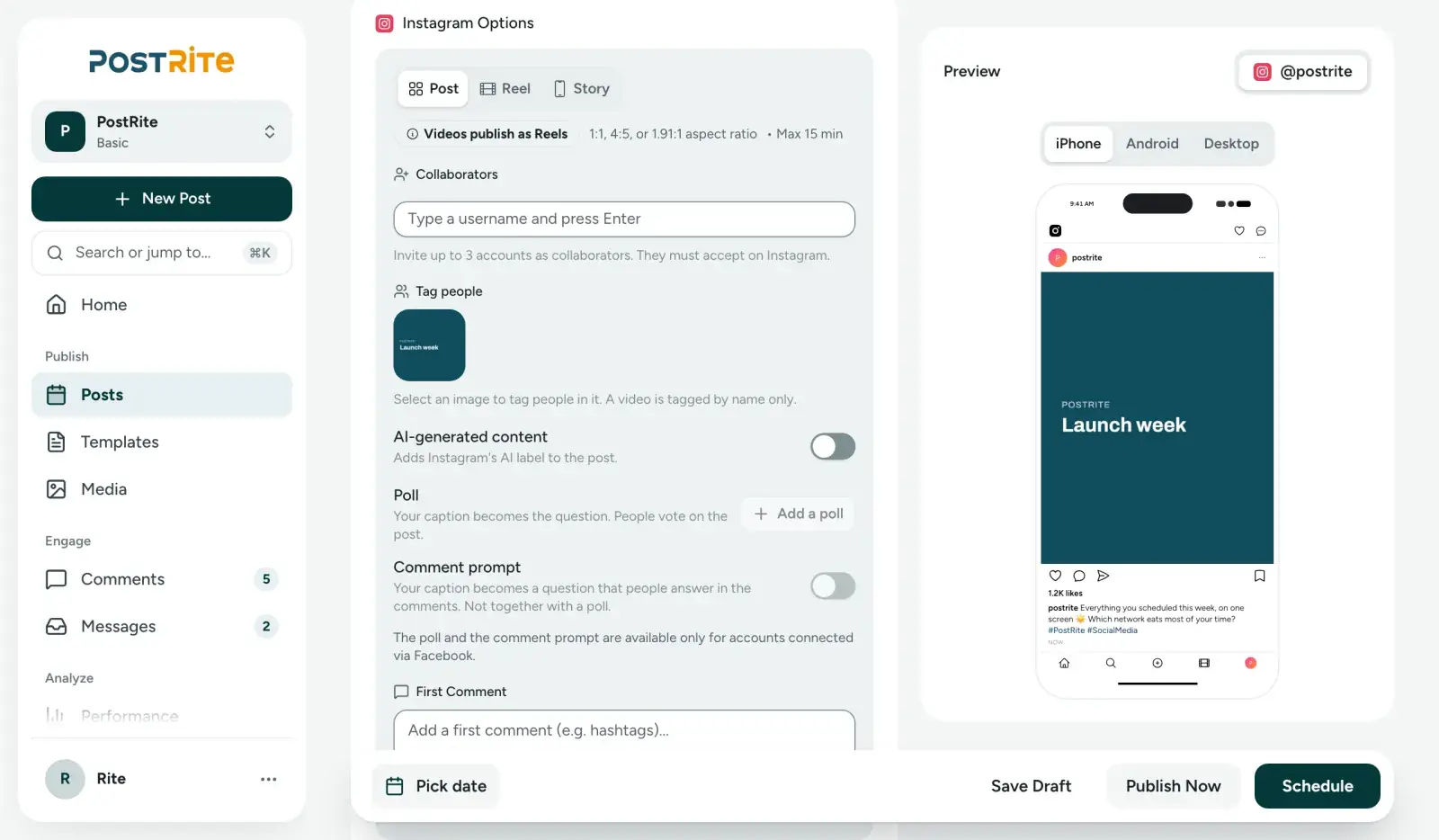
In the editor, Instagram's options sit next to the post preview: post, Reel or Story, collaborators and the AI-generated content label.
For the community team, the comments inbox gathers whatever needs a reply. The AI can handle the repeated questions, and the rest stays with people.
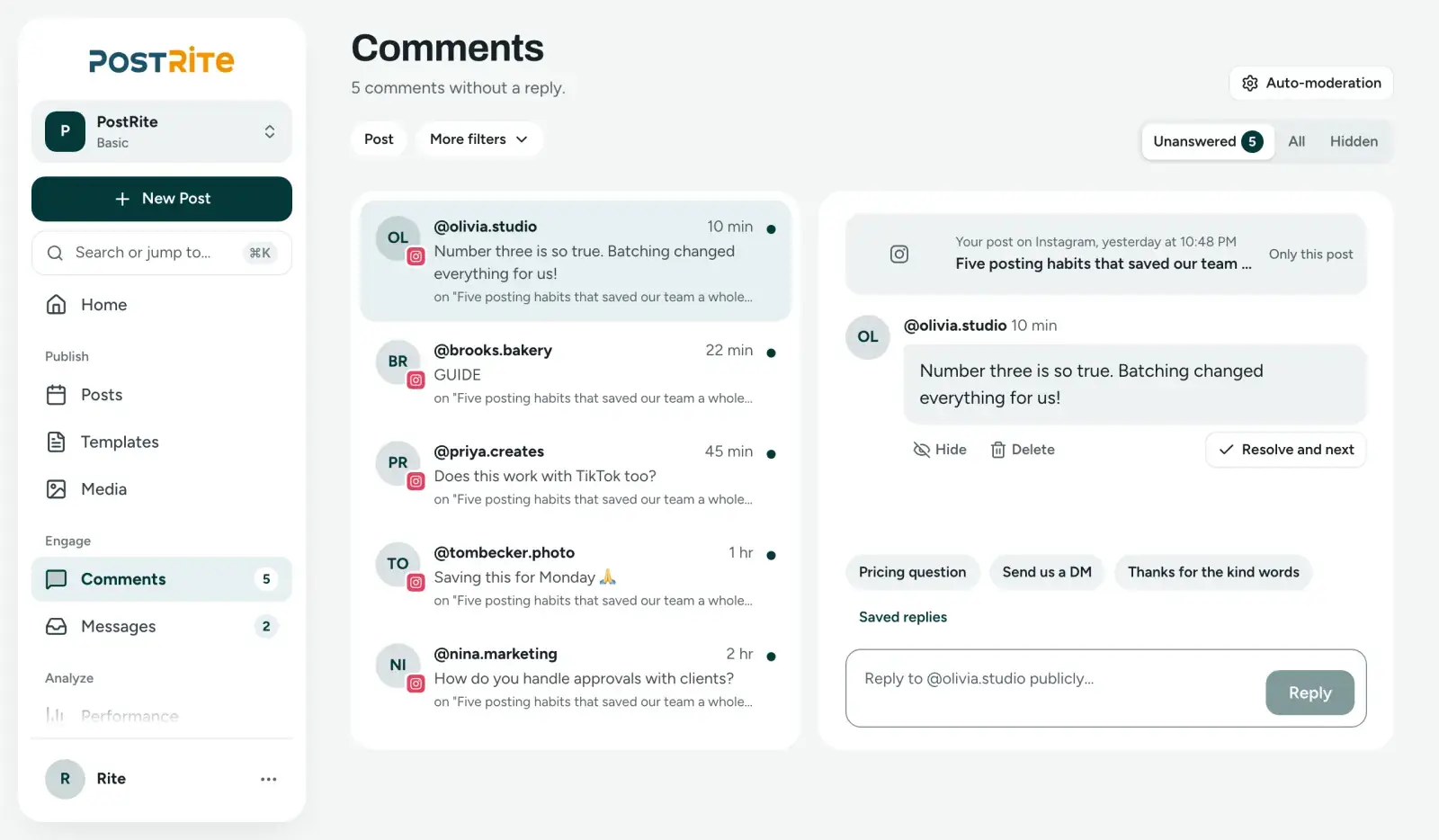
PostRite's comments inbox collects what's still unanswered, with the team's saved replies at hand.
Plans cost US$ 4.99, US$ 9.99 or US$ 24.99 a month, with 3, 6 or 12 connected accounts and unlimited members. Every feature is on every plan. The 14-day trial doesn't ask for a card, and there's no free plan. The Claude page shows what the integration does.
Checklist before connecting AI to your Instagram
- The account is a Business or Creator account.
- The connection uses an official authorization screen and never asks for the Instagram password.
- The owner turned on only what the team will use.
- Deleting via MCP stays off unless there's a clear reason.
- Comment and message replies were enabled only after agreeing on what the AI can answer.
- The instructions say what the AI should leave for a person.
- The AI only reaches the right clients' organizations.
- Someone on the team reviews the calendar after the AI schedules.
Frequently asked questions
Can Claude post to Instagram?
Not on its own. Claude writes the caption, but it needs a connected tool to publish. With an MCP server like PostRite's, it creates and schedules posts, Reels and Stories on your Business or Creator account.
Does ChatGPT work the same way?
Yes, through Developer mode, available on eligible paid ChatGPT plans. Once connected, it uses the same tools and goes through the same authorization screen as Claude.
Do I need to know how to code?
No. In Claude, you connect through the connectors directory. In ChatGPT, you paste the server URL and choose OAuth. Neither requires writing code.
Can the AI delete my posts?
Only if the owner turns on deleting via MCP, which is off by default. While it's off, any attempt to delete a post, template or file is refused.
Can the AI answer DMs?
Yes, when the owner enables comment and message replies. Even then, it only sends messages within 24 hours of the person's last message, as Instagram requires.
Can I use it with a personal Instagram account?
No. Publishing the official way requires a Business or Creator account. Switching is free and done in the app itself.
Does Meta's MCP server work for my account?
Meta's ads server is for paid campaigns. For your account's posts, Reels, Stories and comments, you need a tool that publishes to Instagram and offers an MCP server.
AI doesn't need your password to work on your Instagram. It needs a trustworthy tool in between and clear rules about what it can do. If you want Claude or ChatGPT to schedule posts and handle the repeated questions with those safeguards in place, try PostRite free for 14 days, no card required, and connect your AI to your brand's account.